 Mavera Docs
Operator's Guide
Checking your Mavera sessionLoading workspace audiences and API keys…
Checking…Use or share this pageSend the page itself, print it, or open its complete context in your AI workspace.
Which tool do I use?
One page that untangles Studies vs Talk vs Runner vs everything else.
Interactive product walkthrough
Choose the right Mavera tool
Move through Mave, Talk, Studies, Files, Workflows, and Programs.
Simulation onlyNothing is saved or charged
1
Step 1 of 6Start with Mave
Open Mave for work that can be described in plain language.
Mavera workspace
Good afternoon
Choose a surface from the sidebar to begin.
Demo workspace0 actions completed
Recent workspace activityStatus
Audience comparisonReady to review
Customer interview evidenceGrounded
Campaign pre-flightDraft
- 1Start with MaveOpen Mave for work that can be described in plain language.
- 2Try TalkOpen Talk for reactions, interviews, and group dynamics.
- 3Try StudiesOpen Studies for structured numbers and comparisons.
- 4Try FilesOpen Files when the work begins with evidence you already own.
- 5Try WorkflowsOpen Workflows for a repeatable multi-step job.
- 6Try ProgramsOpen Programs for bounded work that should keep running.
Short answer: ask Mave and she picks. But when you want to drive yourself, here's the map.
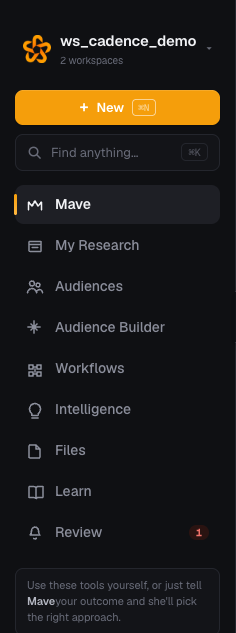
The primary navigation. Start with Mave, audiences, workflows, files, and review.Open full size ↗
"I want to hear people react and discuss"
| You want | Use | Why |
|---|---|---|
| A free-form conversation | Talk → Chat | Pick audience(s) in the composer and just talk. Mave answers in their voice. |
| A moderated group discussion | Talk → Focus Group | 4–8 personas react to a topic and to each other. You get the transcript plus where the room converged and split. |
| One person, deeply | Talk → Deep Interview | Ladders one persona down to root motivations. |
| Two sides arguing | Talk → Debate | Opposing personas argue a motion; useful for stress-testing a claim. |
"I want numbers I can put in a deck"
| You want | Use | Why |
|---|---|---|
| A structured survey | Studies | Real questionnaire, 50+ respondents, statistics computed in code from the responses. |
| A/B test two messages | Studies (or ask Mave) | Variants split automatically; you get shares per variant with confidence. |
| Price sensitivity | Ask Mave or Workflows → Pricing | She'll structure the right study for it. |
"I want the machine to go do research for hours"
| You want | Use | Why |
|---|---|---|
| A market map, GTM plan, competitive teardown | Programs | Long-running research that plans, executes, reads findings, and re-plans — with cited web sources. |
| A guided recipe with cost up front | Workflows | Six ready-made chains, or describe your goal and the builder designs one. |
| A company/competitor audit | Audit | Structured teardown with cited sources. |
"I'm working with my own data"
| You want | Use | Why |
|---|---|---|
| Inspect a completed research study | Ingest | Extract a source-quoted dossier, then assess claims, design, and timeliness. |
| Charts and takeaways from a spreadsheet | Analyze | Drop a file, get an honest read. |
| Manage documents | Files | Upload, read, edit, extract, download. |
Every tool page also has a "Which tool?" callout at the top comparing it to its nearest neighbors, and a Past runs button so you can see what your team already ran.